AI Classification
Every transaction in Bliss is classified by a 4-tier pipeline that learns from your corrections over time.
The 4-tier waterfall
Each transaction flows through these tiers until one succeeds:
Tier 1: Exact Match
An O(1) in-memory cache lookup by description. If you’ve categorized “NETFLIX” before, the next occurrence is matched instantly with confidence 1.0.
Tier 2: Vector Similarity (Tenant)
If no exact match, Bliss computes a 768-dimensional vector embedding using the configured embedding provider and queries pgvector for cosine similarity against your previous classifications. Threshold: reviewThreshold (default 0.70).
Tier 3: Vector Similarity (Global)
Same as Tier 2 but searches across all tenants’ embeddings. Results are discounted by 0.92x since cross-tenant matches are less reliable.
Tier 4: LLM
If no vector match, the configured LLM provider (Gemini, OpenAI, or Anthropic) classifies the transaction with temperature 0.1. The model gets the description, the merchant name, the transaction amount, and (for Plaid imports) Plaid’s own category hint, plus a small set of worked examples for calibration.
Confidence is hard-capped at 0.90. The 0.86–0.90 band is the ABSOLUTE CERTAINTY tier — only valid when the merchant is a globally recognized brand (Starbucks, Netflix, Uber, recurring payroll from a known employer), the Plaid hint matches the chosen category, and the transaction amount is typical for that category. With the default autoPromoteThreshold of 0.90, this is the single path that lets an LLM classification auto-promote; everything else stays at ≤0.85 and goes through review. Tenants who want LLM never to auto-promote (the pre-Phase-2 behavior) can raise autoPromoteThreshold to 0.91+ in Settings.
The LLM can also decline genuinely ambiguous transactions ("ADJUSTMENT 0021", opaque wire transfers, unrecognizable codes) by returning a null category. Those rows surface unclassified in the review queue rather than being assigned a wild guess.
Enabling AI classification
Tier 1 works out of the box. Tiers 2-4 require an LLM provider. Bliss supports three:
- Google Gemini — native embedding support, recommended default.
- OpenAI — native embedding support.
- Anthropic Claude — no embedding API, so requires a secondary provider (Gemini or OpenAI) for embeddings.
Pick one in .env:
LLM_PROVIDER=gemini
GEMINI_API_KEY=your_api_key
See Choosing Your External Services for full setup details, model overrides, and the Anthropic dual-provider pattern.
Without a configured provider, unmatched transactions remain unclassified for manual review — the rest of the app keeps working.
Training the model
The most important thing you can do is review your first ~100 transactions carefully. Every correction you make:
- Updates the exact-match cache immediately (Tier 1)
- Generates a vector embedding asynchronously (Tier 2)
After this initial training period, most transactions will match at Tier 1 or 2 with high confidence — the LLM is only invoked for genuinely new merchants.
Tuning thresholds
Two tenant-level thresholds control the pipeline behavior:
| Threshold | Default | Effect |
|---|---|---|
autoPromoteThreshold | 0.90 | Classifications above this are saved without review. EXACT_MATCH (always 1.0) and high-confidence VECTOR_MATCH routinely clear this. LLM only clears it when the ABSOLUTE CERTAINTY criterion holds (recognized brand + Plaid hint match + typical amount). |
reviewThreshold | 0.70 | Minimum vector similarity score to accept a match |
Adjust these in Settings based on your comfort level. Lower autoPromoteThreshold = less manual review but more risk of misclassification. Raise to 0.91+ if you want to keep the pre-Phase-2 behavior where the LLM never auto-promotes.
Expense tracking
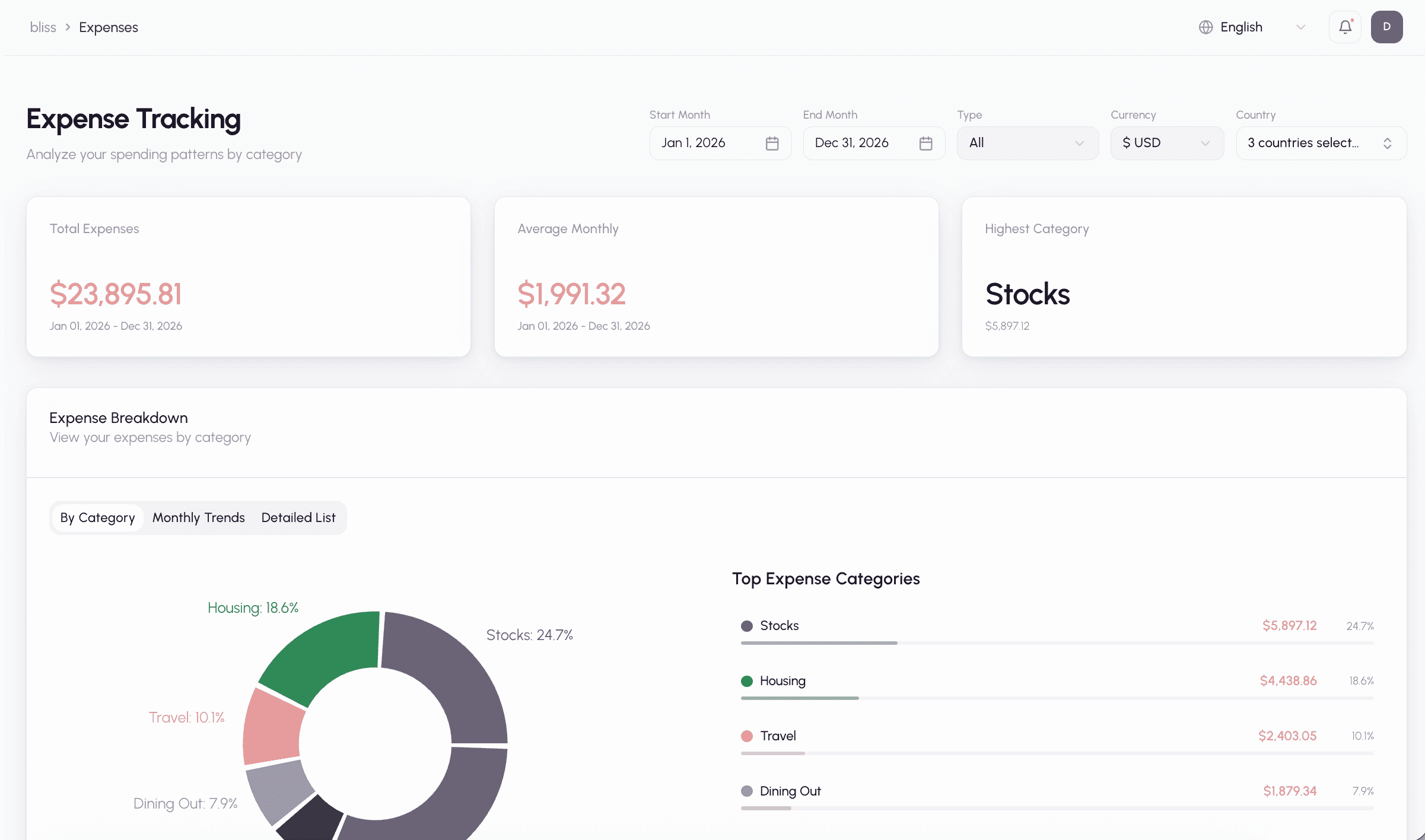
Once classified, your transactions power the expense tracking dashboard with category breakdowns, monthly trends, and spending analysis.
Next steps
- Choosing Your External Services — full provider comparison, configuration, and switching guide
- Importing transactions — the review flow where you train the AI
- Explore the AI Classification spec for full technical details