Maintenance
When Bliss data looks wrong or a background process seems stuck, this guide tells you what to check first, where the tools live, and how to recover. Most issues resolve via the Settings → Maintenance tab (tenant admins only) without touching the database directly.
Finding the Maintenance tab
- Sign in as a tenant admin (your role is
admin, notmemberorviewer). - Go to Settings in the sidebar.
- Click the Maintenance tab (wrench icon). If you don’t see it, your account isn’t an admin — ask another admin on your tenant to grant the role from Settings → Users.
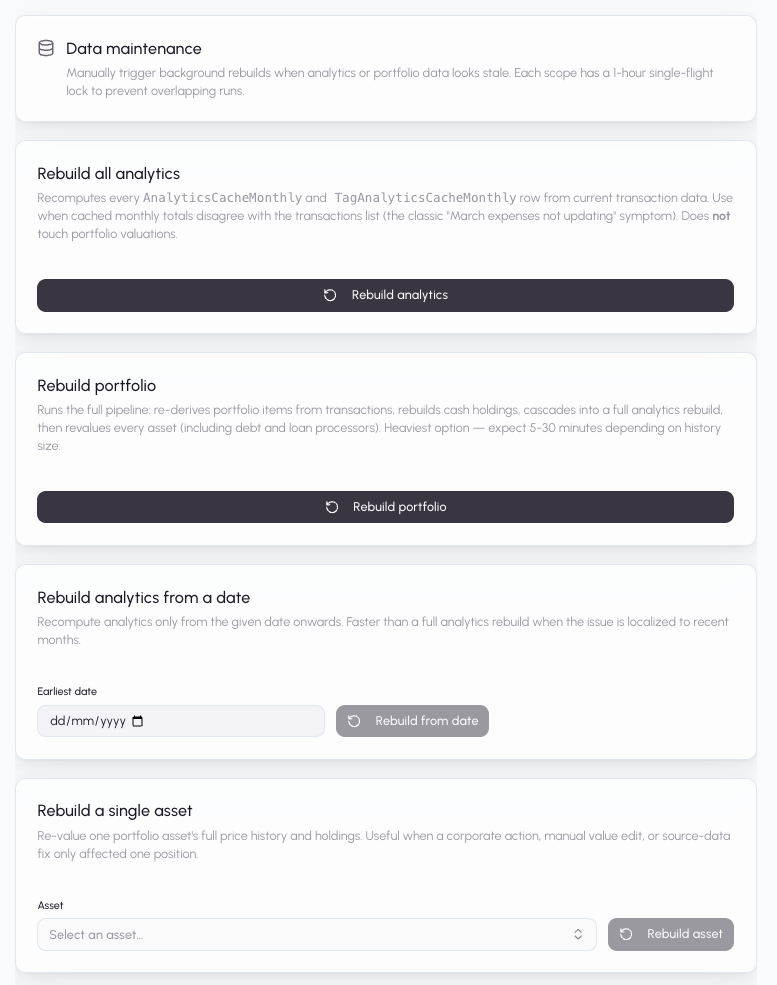
The tab has five maintenance options and a history of the last 20 manual rebuilds. All operations are safe to run — they rebuild caches from source-of-truth data, they don’t lose transactions or portfolio items.
Symptom-based playbook
”My expenses for a past month look wrong in the Financial Summary”
Cached analytics rows are out of sync with the underlying transactions. Most often caused by:
- A bulk operation (import, bulk categorization, tag edit) that finished without triggering the normal re-aggregation.
- A scoped rebuild that failed silently for a single month.
Fix: Settings → Maintenance → “Rebuild analytics from a date”.
Pick a date at or before the first visibly-wrong month and click
Rebuild from date. This wipes and recomputes
AnalyticsCacheMonthly and TagAnalyticsCacheMonthly rows from that
date forward, without touching portfolio valuations. Takes seconds to a
couple of minutes depending on how many transactions fall in range.
If several months are affected across the entire year, use “Rebuild all analytics” instead — it’s a full-tenant rebuild of the analytics cache only.
”My portfolio values look stale or don’t match live prices”
Cached PortfolioValueHistory / PortfolioHolding rows are out of
sync. This can happen after:
- A corporate action (stock split, delisting) that the valuation worker hadn’t seen yet.
- A long period of not logging in — price forward-fill may have bugged out on one or two assets.
- A manual value edit on a specific asset.
Fix options:
- One asset only: Settings → Maintenance → “Rebuild a single asset” → pick the asset from the searchable dropdown → click Rebuild asset. Fastest option — rebuilds only that item’s history.
- All assets: Settings → Maintenance → “Full rebuild”. This runs the full pipeline (items → cash → analytics → valuation + loan processors). Expect 5-30 minutes depending on history size. Heaviest option; use when the damage isn’t localized.
”Stock P/E ratios, EPS, or dividend yields look wrong or show — on the Equity Analysis page”
SecurityMaster (the global stock fundamentals table) is refreshed
nightly at 3 AM UTC from Twelve Data’s /profile, /earnings,
/dividends, and /quote endpoints. When the response is inconsistent
for a given symbol — sparse history, off-by-one timezone on the latest
quarter, missing fields — the row is flagged untrusted and consumers
hide the affected fields rather than show wrong numbers. A — on the
Equity Analysis page means “data is missing or untrustworthy,” not a
bug.
Fix: Settings → Maintenance → “Refresh stock fundamentals” → click Refresh fundamentals. This enqueues an immediate run of the same job the nightly cron triggers, iterating every active stock symbol across all tenants and re-fetching from Twelve Data. Each symbol takes about 2 seconds (rate-limited at 30 calls/min for the fundamentals slot), so a portfolio with 50 stocks finishes in ~2 minutes. The button only disables briefly while the request enqueues — the actual refresh runs in the background.
Verifying it worked: reload the Equity Analysis page after a couple
of minutes. Symbols whose underlying Twelve Data data was salvageable
will show numbers; symbols where Twelve Data is genuinely
unreliable will continue to show —. That’s the trust gate working as
intended — wrong data is worse than missing data for portfolio
intelligence and insights.
If you click the button rapidly, BullMQ will queue duplicate runs serially (concurrency 1 on the security-master worker). It won’t double-call Twelve Data per symbol within a single run, but a queued duplicate will re-run everything once the first finishes — usually harmless, just unnecessary credit usage on Twelve Data.
”A transaction I imported doesn’t show up in analytics”
Usually means the scoped-update-analytics job for that month didn’t
run or failed. First:
- Confirm the transaction is visible in Transactions. If not, the issue isn’t analytics — it’s the import itself.
- If the transaction is there but its month’s analytics look incomplete, use “Rebuild analytics from a date” with a date at or before the transaction’s month.
”The system ran a rebuild that’s still showing as Running for way too long”
Rebuilds are bounded by per-job BullMQ lock durations (5-30 minutes depending on the job type) and self-heal when they stall. But if something is truly stuck:
- Check the Recent rebuilds history on the Maintenance tab. If the
job’s state is still
active, wait — a full-portfolio rebuild on a 15k-transaction tenant can legitimately run 15-30 minutes. - Look at the backend Railway logs for your tenant’s rebuild. Search
for your
tenantId— you should see batch progress like[AnalyticsWorker] Processing batch of 1000. Total processed: 5000/29438. If progress is advancing, it’s working. If you seecould not renew lock for job <n>errors, the worker lost its Redis lock — BullMQ’s stalled-job checker will re-queue it. - The 1-hour
rebuild-lock:*TTL is a safety ceiling. If a worker crashes and the lock never releases, it auto-clears after an hour and you can retry.
”I triggered a rebuild but the Maintenance tab shows 409 ‘Already running’ and I can’t re-trigger”
A per-(tenant, scope) single-flight lock is held by a previous trigger. Usually because:
- The terminal job of the chain is still running. Watch the Current
section for a job in
active/waitingstate — once it completes, the lock releases within seconds and the button becomes clickable again. - The previous rebuild crashed and its lock hasn’t TTL-expired yet. The
Next available in X mincountdown shows the remaining TTL. Wait it out or reach out to ops to manually clear the Redis keyrebuild-lock:<tenantId>:<scope>.
You can still run a different rebuild scope in the meantime —
locks are per-scope, so full-analytics and single-asset don’t block
each other.
”I’m a member (not admin) and I need a rebuild”
Ask the admin on your tenant to run it for you. The Maintenance tab and
its API endpoints return 403 Admin access required for
non-admin roles by design — rebuilds are expensive operations that
admins should own.
Before reaching for a rebuild
Some issues look like stale caches but are actually the underlying data being wrong. Check these first:
- Missing transactions: go to Transactions. If you don’t see the transaction there, no rebuild will fix it. Re-import or add it manually.
- Wrong categorization: a rebuild doesn’t re-categorize transactions. Edit the category on the transaction itself (or use the transaction review page for bulk fixes).
- Wrong portfolio holdings: holdings are derived from transactions via FIFO. If the transactions are wrong (missing buys, incorrect quantities), fix them first, then rebuild.
- Live price discrepancies: the pricing providers (Twelve Data, manual values) are the source of truth. Check that the symbol / ISIN / exchange on your portfolio item is correct — a wrong ticker is usually the reason a price looks stale.
Advanced: reading the rebuild history
Each completed or failed rebuild in the history panel includes:
- Scope — which kind of rebuild.
- State badge — Completed, Failed, Running, or Queued.
- Requester email — who clicked the button.
- Elapsed time — how long ago it finished.
- Failure reason (failed only) — the error message from the final failed attempt.
- Attempts (when > 1) — how many times BullMQ retried. Multiple attempts usually indicate transient Redis or Prisma Accelerate issues that eventually recovered.
History is retained for 30 days in Redis. If Redis restarts, history is wiped but in-flight jobs are preserved via BullMQ’s own durable state.
What a rebuild does NOT touch
- Transaction records (
Transaction). - Portfolio item records (
PortfolioItem) — except when runningfull-portfolio, which rewrites theircostBasis/quantity/realizedPnLfields from transactions. - Categories, tags, accounts, bank connections, Plaid items.
- User settings, tenant settings, currency configurations.
- Currency rates.
If anything on the above list looks wrong, you have a different problem — a rebuild won’t help.