Bank Sync with Plaid
Bliss integrates with Plaid for automatic bank transaction sync. Transactions are fetched incrementally, deduplicated, and classified by the AI pipeline.
Setup
- Sign up at plaid.com/dashboard for API credentials.
- Add to your
.env:
PLAID_CLIENT_ID=your_client_id
PLAID_SECRET=your_secret
PLAID_ENV=sandbox # sandbox, development, or production- Restart services.
For testing, use sandbox with credentials user_good / pass_good.
Connecting an account
- Navigate to Accounts and click Connect Bank Account.
- Complete the Plaid Link flow to authorize your bank.
- Bliss starts an initial sync immediately.
How sync works
Bliss uses a two-worker architecture:
- plaidSyncWorker — Fetches new transactions via cursor-based pagination (IO-bound)
- plaidProcessorWorker — Classifies and persists each transaction (CPU-bound)
Syncs run automatically and incrementally — only new transactions since the last cursor are fetched. Hash-based deduplication catches any manual-entry duplicates.
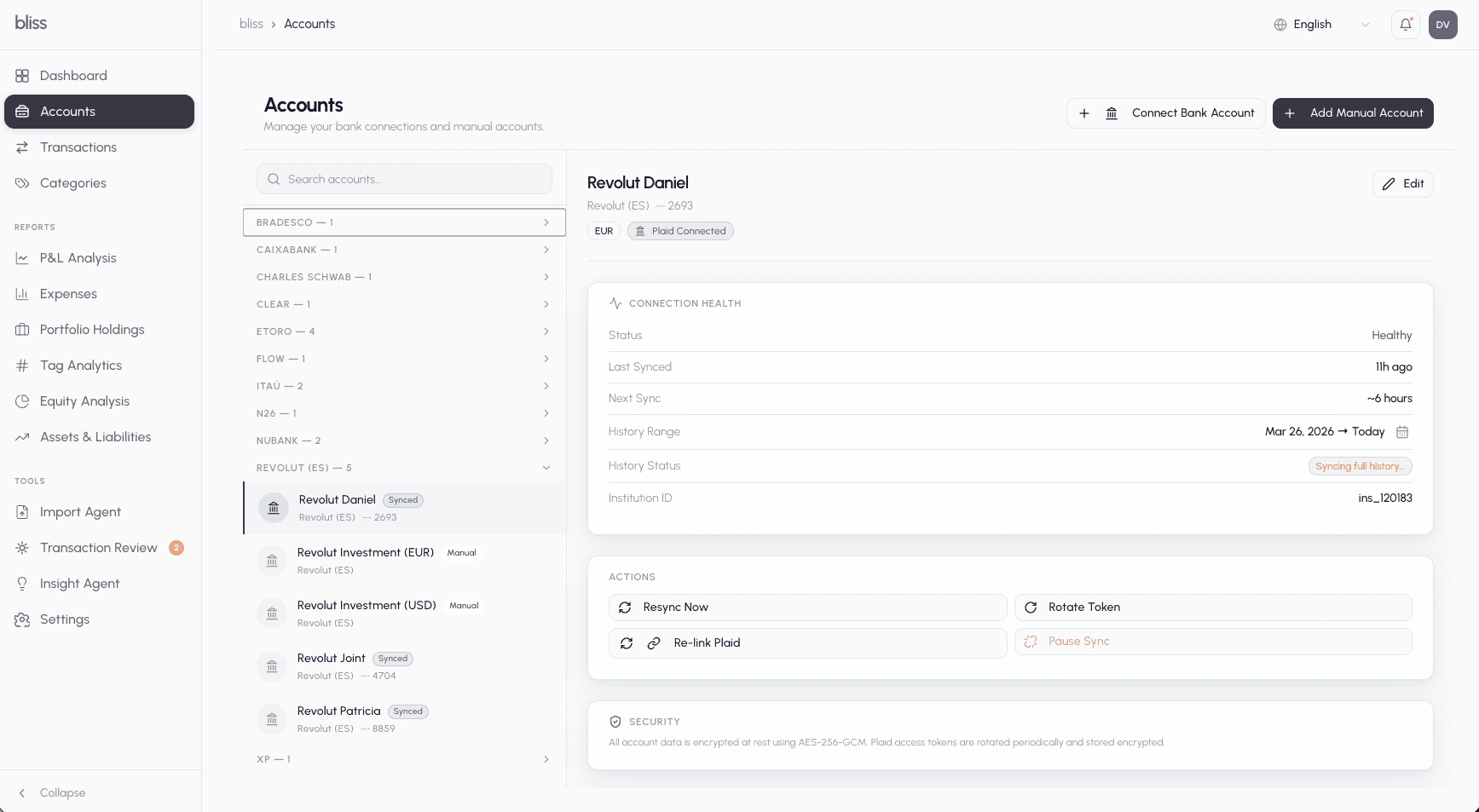
Connection health
The account detail view shows:
- Connection status and last sync time
- Sync logs with error details
- Token rotation — re-authenticate if Plaid tokens expire
- Re-sync — trigger a manual sync at any time
Deleting an account
Delete an account from its detail panel on the Accounts page, in the Danger Zone card at the bottom. Deletion is permanent — there is no archive or undo — so a confirmation dialog always appears first.
Two guards protect you from a broken state:
- Disconnect a bank connection first. A Plaid-linked account can’t be deleted while its bank connection is live — otherwise the next sync would just recreate it. Use Pause Sync in the Actions card to disconnect, then delete. Until you do, the Delete button stays disabled with a reminder.
- Remove or reassign transactions first. An account that still has transactions can’t be deleted. The dialog tells you how many are linked; move them to another account or delete them, then retry. (Bliss has no bulk “reassign then delete” flow yet.)
When deletion succeeds, the account disappears from the list, the Transactions account filter, and portfolio/analytics groupings immediately. Investment holdings that were linked to the account are kept but become unlinked.
Plaid + AI classification
Plaid provides its own category hints, which Bliss passes to the AI pipeline as additional context. The 4-tier classification waterfall runs on every Plaid transaction, and results above the autoPromoteThreshold are saved directly without manual review.
Next steps
- AI classification — understand how the pipeline classifies transactions
- Importing transactions — supplement Plaid with CSV imports