Financial Insights
Bliss generates AI-powered financial reports that analyze your patterns across four cadences — monthly, quarterly, annual, and portfolio-specific.
How it works
Fifteen financial lenses organized into six categories (Spending, Income, Savings, Portfolio, Debt, Net Worth) examine your transaction and portfolio data. Each insight is generated by your configured LLM provider and persisted additively — old insights are kept for historical context, not replaced. A data-completeness check runs before every generation so partial periods are never compared to full ones.
The prompt sent to the LLM is built in four cacheable layers (identity, tier addendum, lens-specific rubrics, few-shot examples) so providers like Anthropic and Gemini can serve repeat runs from cache. Before the call, a deterministic JS pre-pass computes the heavy lifting — month-over-month deltas, top movers, top-category share vs the user’s own 6-month baseline, anomalies (categories above 2σ from their own mean), savings-rate decomposition, and net-worth split between contributions and market change. The model writes prose about pre-computed signals rather than recomputing arithmetic, which is the single biggest reason output quality is high and consistent across providers.
Output is structured: each provider validates the response server-side (Anthropic via forced tool use, OpenAI via strict response_format: json_schema, Gemini via responseSchema). When the model genuinely has nothing to report — completeness gate fails, no active lenses, or it returns an empty array — the page surfaces a “No insights for this period yet — try regenerating in a few minutes” message instead of fabricating filler.
The four tiers
Monthly (2nd of each month)
A month-over-month and year-over-year health check. Covers spending velocity, category concentration, income stability, savings rate, and net worth trajectory for the previous month.
Quarterly (3 days after quarter close)
Seasonal trend analysis across a full quarter. Identifies patterns that monthly snapshots miss — holiday spending spikes, quarterly income cycles, and longer-term drift.
Annual (January 3rd)
A comprehensive year-in-review covering all six categories. Compares the full year against the prior year and highlights the biggest shifts in your financial profile.
Portfolio (every Monday)
Equity-specific intelligence powered by the SecurityMaster reference table. Analyzes overall exposure, sector + industry concentration (so a “Technology 47%” headline can be unpacked into the industries inside it — semiconductors, software, etc.), and dividend-driven passive income. When you maintain a “Passive Income” category in your financial summary, the lens anchors on the actual income posted over the last 90 days rather than projecting from yields alone — actuals are more credible than estimates. Weighted P/E vs the broader market is included as context only; third-party fundamentals data is approximate and the lens is intentionally tuned not to alarm. Holdings whose Twelve Data fundamentals are flagged as untrusted (see the Maintenance guide) are silently excluded from the insight rather than fed to the model with potentially-wrong numbers — wrong data is worse than missing data here.
Enabling insights
Insights use the same LLM provider you configured for transaction classification. Pick one in .env:
LLM_PROVIDER=gemini            # or openai, or anthropic
GEMINI_API_KEY=your_api_key
See Choosing Your External Services for full provider setup details.
The insights tier uses whichever model is configured for your provider (per-provider defaults are documented in Choosing Your External Services). You can override via env var:
INSIGHT_MODEL=gpt-4.1 # override the active provider's default insight modelA daily cron job at 6 AM UTC acts as a scheduling heartbeat — it checks each tier’s calendar window and only triggers generation when the window is open. The portfolio tier runs on its own cron at 5 AM UTC every Monday.
Without a configured LLM provider, the insights page remains accessible but empty.
Using the insights page
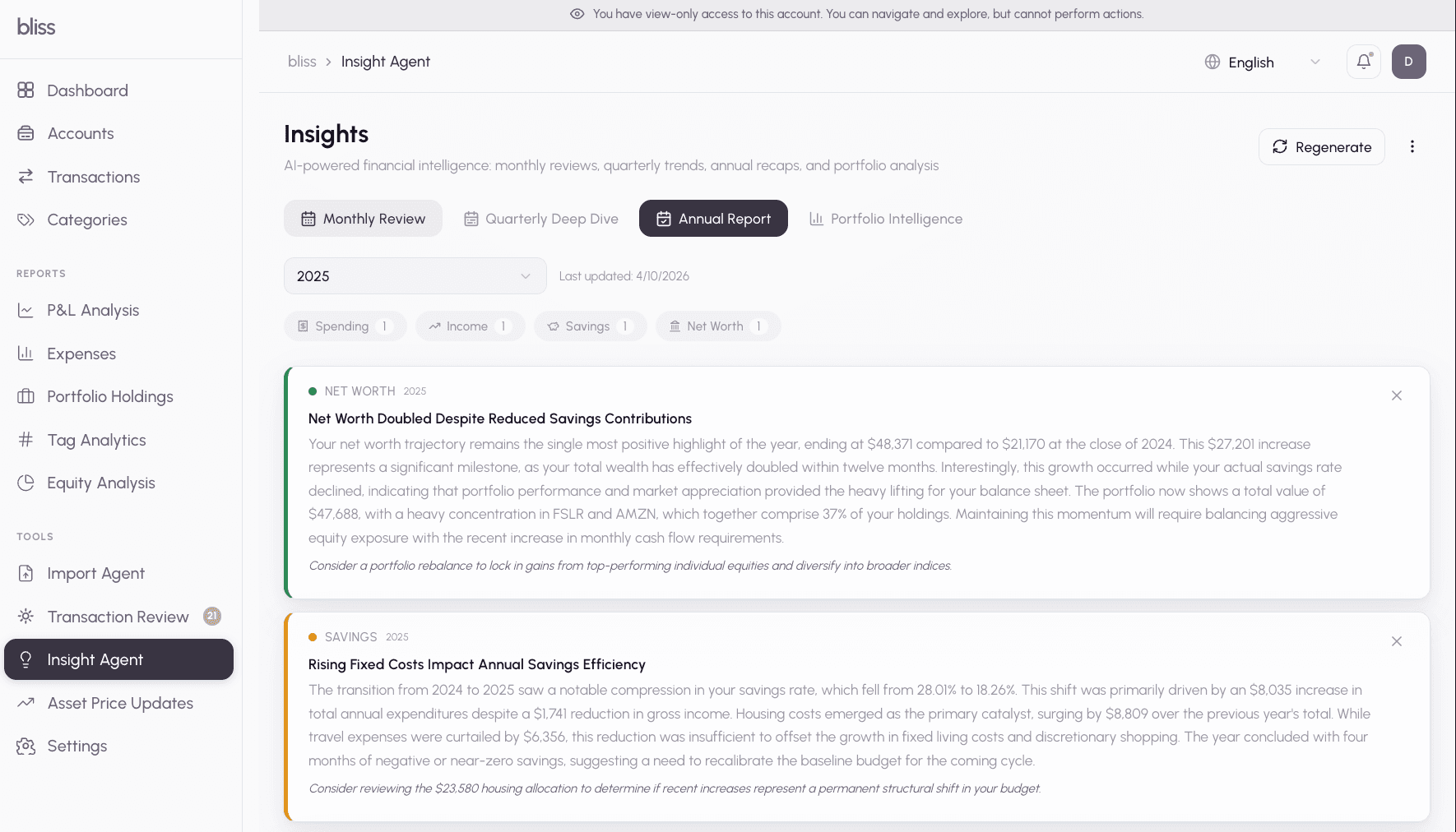
The insights page organizes your reports into browsable categories:
- Category tabs — Filter by Spending, Income, Savings, Portfolio, Debt, or Net Worth
- Severity chips — Focus on what matters: Positive, Info, Warning, or Critical
- Tier badges — Each insight shows which cadence generated it (Monthly, Quarterly, Annual, Portfolio)
- Period selector — Browse insights from any past period
- Manual refresh — Pick a tier and period, then generate on demand. Use the
forceoption to bypass the completeness check for partial periods - Dismiss and restore — Hide insights you’ve acted on. Dismissed state persists even when the same period is regenerated
Deduplication
Insights are deduplicated by (tier, periodKey, dataHash). If your underlying data hasn’t changed since the last generation, regenerating a period is a no-op — no duplicate insights are created.
Retention
Each tier has a different retention window:
| Tier | Retention |
|---|---|
| Monthly | 2 years |
| Quarterly | 5 years |
| Annual | Forever |
| Portfolio | 1 year |
Expired insights are cleaned up via the TTL retention service.
Next steps
- Choosing Your External Services — which LLM to use for insights
- AI Classification — insight quality depends on accurate classification
- Investment Portfolios — the portfolio tier uses SecurityMaster fundamentals
- Explore the Insights spec for full technical details