Investment Portfolios
Bliss tracks investment holdings with FIFO lot calculation, multi-currency PnL, and real-time pricing.
How it works
When you import or create buy/sell transactions with a ticker symbol, the portfolio pipeline processes them automatically:
- Portfolio initialization — Creates or updates portfolio items for each (ticker, account) pair. The same ticker held in two different brokerage accounts produces two independent portfolio items with separate lot stacks and PnL tracking.
- FIFO lot calculation — Each buy creates a lot; sells consume the oldest lots first, scoped to that account.
- FX rate capture — Each lot records the buy-date exchange rate for accurate cross-currency PnL.
- Valuation — Current prices fetched via a 4-stage waterfall: memory cache, live API, 7-day DB lookback, manual value fallback.
The pipeline runs automatically whenever transactions change, triggered by the event-driven architecture.
Data-quality flag: If a sell transaction has no matching buy lot in the same account (e.g., a cross-account transfer recorded as a close), the portfolio item is flagged with
hasLotMismatch: true. This warning appears in the transaction form to prompt correction.
Setting up investment accounts
Investment accounts work like any other account but hold transactions with ticker data. You can:
- Create them via the UI (Accounts > Add Manual Account)
- Include them in your tenant seed script
- Import transactions with ticker data via Bliss Native CSV
Importing investment transactions
The key columns for investment transactions in the Bliss Native CSV format:
transactiondate,description,debit,credit,account,category,ticker,assetquantity,assetprice,currency
2024-01-15,Buy AAPL,5000,,Schwab,Stocks,AAPL,25,200,USD
2024-03-20,Sell AAPL,,3200,Schwab,Stocks,AAPL,10,320,USD
2024-06-01,Buy VWCE,2000,,Revolut Investment (EUR),ETFs,VWCE.DEX,15,133.33,EUR
When a ticker is present, Bliss automatically looks up the security metadata from Twelve Data (name, exchange, type).
Portfolio dashboard
The portfolio page shows total value, asset allocation, and holdings grouped by type.
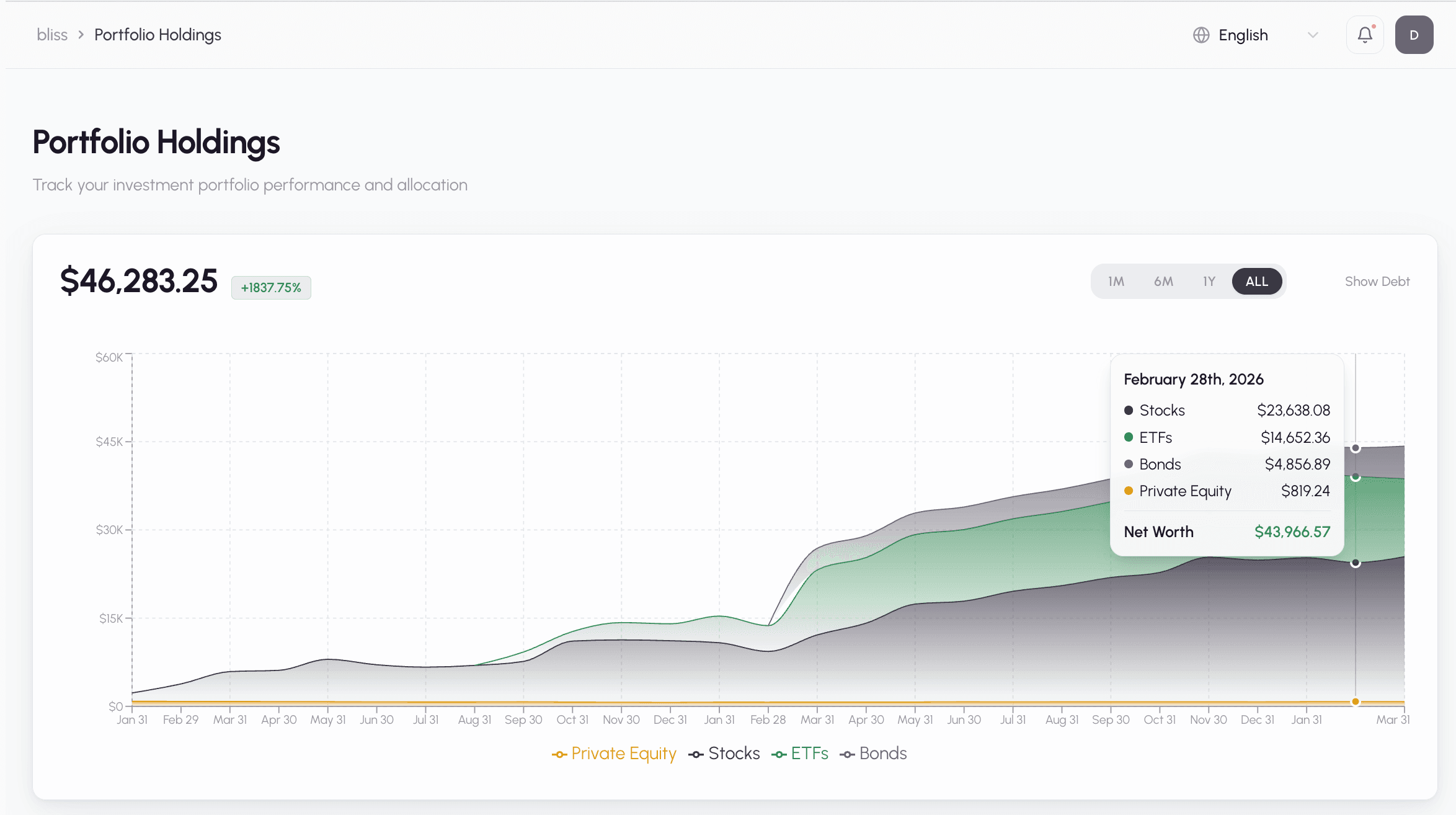
See one holding over time. Next to the account filter, the All holdings picker lets you search your holdings by symbol and chart just one of them. The chart then shows that holding’s value alone, and the headline and % change follow it. Under All accounts, a symbol you hold with several brokers is shown as their sum. Pick an account to see only that account’s position. Closed positions are hidden until you turn on Show closed positions in the picker. You can also click the chart icon on any row of the holdings table. Clear the selection with ×. The selection is kept in the page link (?holding=AAPL), so you can bookmark or share a holding’s chart.
Supported asset types: Stocks, ETFs, Crypto, Bonds, Real Estate, Private Equity, Pension Plans, and more.
Enabling live prices
For real-time stock pricing, add a Twelve Data API key:
TWELVE_DATA_API_KEY=your_api_key
STOCK_PROVIDER=twelvedata
Without an API key, the portfolio still works — it uses the last known price from your transactions or manual value updates.
Manual value assets
For assets without live pricing (real estate, private equity), record their value on the Manage Assets page (sidebar → Manage Assets, /assets). These are captured as point-in-time valuations.
Manage Assets
Manage Assets lists every asset and liability you hold, and is the one place to edit their data:
- Update price and Price history — for manually priced assets. A “Price stale” chip appears after 30 days without a new value (Warning at 60, Critical at 90).
- Add/Edit terms — interest rate, term and origination date for loans and mortgages.
- Income terms — dividends, coupons, rent or interest for the passive income projection.
- Asset class — override the automatic class (for example, mark a fund as a Bond ETF). It applies to every holding of that symbol.
At the top, Needs attention shows what to fix, with a count for each: prices to update, loans without terms, holdings missing income terms, and lot mismatches to review. Tap a card to see only those rows; when there’s nothing to fix it says All caught up. The list puts the most urgent rows first (the oldest prices lead), and each one has a button for its fix — Update price, Add debt terms or Add income terms. Choose A–Z in the sort menu for the plain alphabetical list.
Search by symbol or name, filter by type, account or asset class, or tap a status chip to filter. The problem chips (Price stale, Debt terms missing, Income terms missing, Lot mismatch) come first; Dividend override and Asset class overridden are shown in grey because they’re your own choices, not problems. The list loads 50 rows at a time; use Load more for the rest. Closed positions are hidden unless you turn on Show closed positions.
If a portfolio rebuild detached some income terms from their holding, a banner at the top lets you re-attach them to the right holding or discard them.
On a phone, each asset is a card with its actions in the ⋯ menu, and the filters are behind the Filter button.
Equity Analysis
The Equity Analysis page (/reports/equity-analysis) breaks your stocks and ETFs down by sector, industry, country or asset class, next to weighted fundamentals such as P/E, EPS and dividend yield. It covers equities only, so its breakdowns match its KPI cards. The whole-portfolio breakdown lives on the Portfolio page, and bond details are on Passive Income.
- Asset classes — Bliss classifies every holding automatically into one of 12 classes: Stock, Index ETF, Sector ETF, Bond ETF, REIT, Fund, Government bond, Corporate bond, Real estate, Crypto, Cash or Other. If it gets one wrong, override it from Manage Assets.
- ETF look-through — In the sector and country views, each ETF is spread across its underlying sectors and countries by weight, instead of showing up as one block. Any remainder goes to Other, an ETF with no composition data shows as Diversified, and bond ETFs show as Fixed Income. The industry view is never looked through. Switch Look through ETFs off to see each ETF as a single bucket.
- Where the data comes from — ETF composition is fetched from Twelve Data and refreshed weekly. P/E stays stock-only, because it isn’t meaningful for a fund.
Next steps
-
Passive income — projected dividends, coupons, rent and interest
-
Bank sync with Plaid — automatic investment account sync
-
AI classification — how transactions are categorized