Initial Account Setup
When you first set up Bliss, you need to create the accounts, banks, and currencies that reflect your financial reality. You can do this one by one through the UI, or use the bulk seed script to set everything up at once.
Global reference data (seeded automatically)
The global seed (prisma/seed.js) runs automatically during Docker setup or prisma db seed. It populates shared reference data that all tenants can use:
- 16 countries — US, UK, Germany, France, Spain, Portugal, Brazil, Canada, Australia, Japan, Switzerland, Mexico, Italy, Netherlands, Singapore, India
- 11 currencies — USD, EUR, GBP, BRL, CAD, AUD, JPY, CHF, MXN, SGD, INR
- 30 banks — Major banks across US (Chase, Bank of America, Citi, Capital One, Amex, Discover, US Bank, Schwab, Fidelity), UK (HSBC, Barclays, Lloyds, Monzo, Santander UK), Spain (BBVA, CaixaBank, Santander), France (Boursorama, Credit Agricole), EU (N26, Revolut, Wise, Deutsche Bank), Brazil (Nubank, Itau), Canada (RBC, TD Canada), Australia (ANZ, Commonwealth Bank), and brokerages (Interactive Brokers)
- 32 import adapters — Preconfigured CSV column mappings for the banks above (plus generic fallbacks and a Bliss Native format). These enable automatic format detection when importing transactions via CSV. See Importing transactions for the full list.
If your country, currency, or bank isn’t listed, add it to prisma/seed.js and re-run pnpm exec prisma db seed. The seed is idempotent — existing records are updated in place, and new entries are created without affecting existing data.
What the tenant seed script does
apps/api/scripts/seed-tenant-setup.mjs is an idempotent Node.js script that creates:
- Countries your accounts operate in
- Currencies you use
- Banks you hold accounts with
- Accounts linked to their bank, country, and currency
- Custom categories beyond the default set
Existing records are skipped — safe to run multiple times.
Customize the seed data
Edit the SEED_DATA object in the script. Here’s a trimmed example:
const SEED_DATA = {
  countries: [
    { id: 'USA', iso2: 'US', name: 'United States', emoji: '🇺🇸', isDefault: true },
    { id: 'ESP', iso2: 'ES', name: 'Spain', emoji: '🇪🇸' },
    { id: 'BRA', iso2: 'BR', name: 'Brazil', emoji: '🇧🇷' },
  ],

  currencies: [
    { id: 'USD', name: 'US Dollar', symbol: '$', isDefault: true },
    { id: 'EUR', name: 'Euro', symbol: '€' },
    { id: 'BRL', name: 'Brazilian Real', symbol: 'R$' },
  ],

  banks: [
    { name: 'Chase' },
    { name: 'Charles Schwab' },
    { name: 'Revolut' },
  ],

  accounts: [
    { name: 'Chase Checking', accountNumber: '****4821', bank: 'Chase', country: 'USA', currency: 'USD' },
    { name: 'Schwab Brokerage', accountNumber: '****7053', bank: 'Charles Schwab', country: 'USA', currency: 'USD' },
    { name: 'Revolut Personal', accountNumber: 'ES12XXXX0001XXXX1234XX', bank: 'Revolut', country: 'ESP', currency: 'EUR' },
  ],

  categories: [
    { name: 'Coworking', group: 'Productivity', type: 'Growth', icon: '💼', processingHint: 'coworking space membership or day pass' },
  ],
};
Tips:
isDefault: trueon a country/currency sets it as the tenant’s default.- Account numbers are encrypted at rest automatically.
- Category
typemust be one of:Income,Essentials,Lifestyle,Growth,Investments,Debt,Transfers.
Run the seed
# Preview what would be created (no changes)
node apps/api/scripts/seed-tenant-setup.mjs --dry-run <tenantId>

# Execute
node apps/api/scripts/seed-tenant-setup.mjs <tenantId>
Find your tenantId in the database (Tenant table) or from the API response after signup.
Managing categories
Beyond the seed script, you can manage categories through the UI at any time.
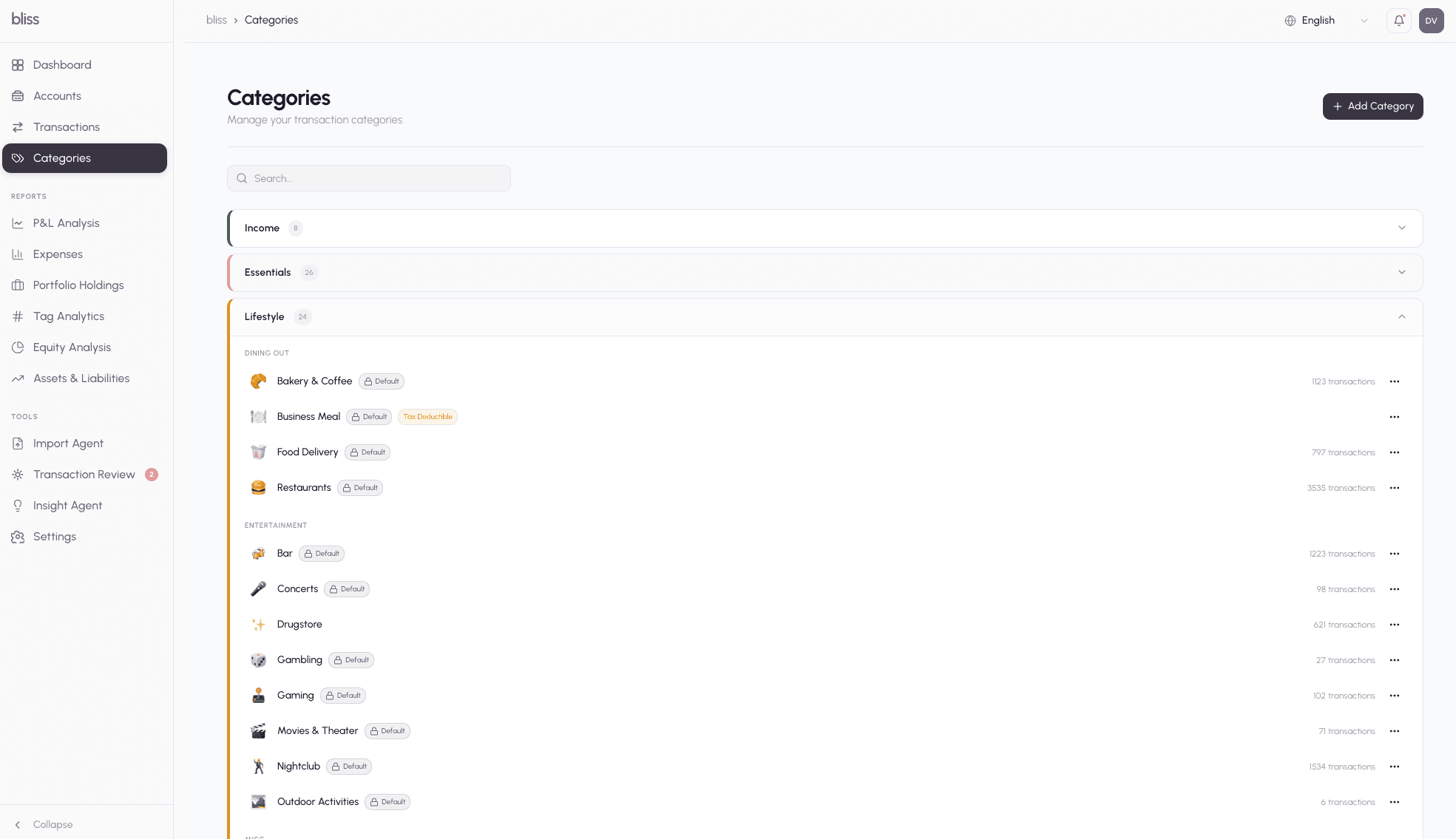
The default set includes ~70 categories across Income, Essentials, Lifestyle, Growth, and more. Custom categories created via the seed script or UI appear alongside the defaults.
Next steps
- Import transactions — bring in your history via CSV
- Investment portfolios — set up investment tracking