Passive Income
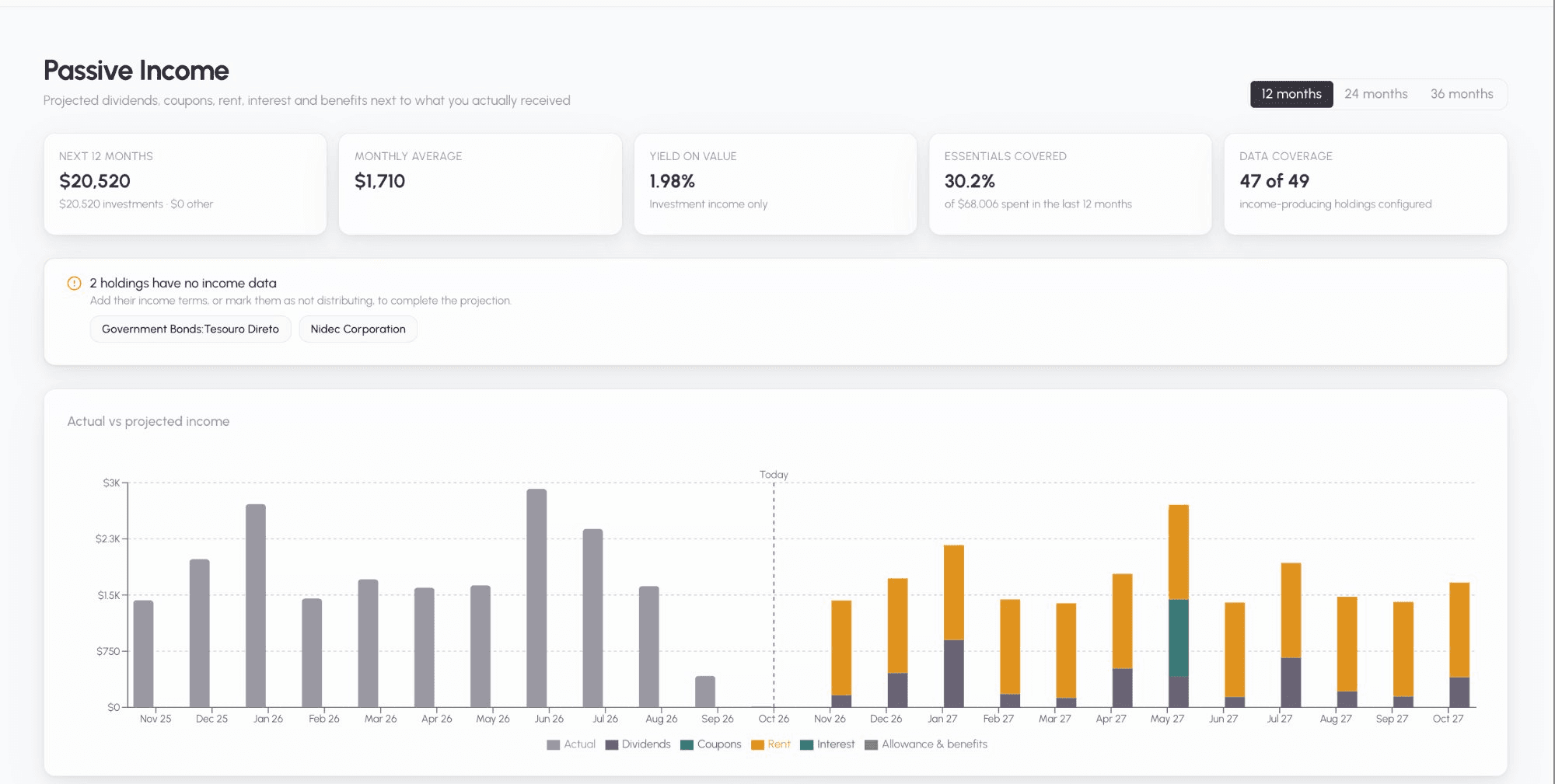
The Passive Income page (Reports → Passive Income) shows how much your holdings and recurring benefits are expected to pay over the next 12, 24 or 36 months, next to what you actually received over the last 12 months.
Everything is gross (before tax) and shown in your portfolio currency, converted at today’s rates.
What counts as passive income
| Source | Where the numbers come from |
|---|---|
| Stock & ETF dividends | Automatic: Bliss replays each dividend paid in the last 12 months one year later (ex-date + 14 days), at today’s quantity. You can override it. |
| Bond coupons | Income terms you enter: face value, coupon rate (or index + spread), frequency, maturity. |
| Rent | Net monthly rent, optional yearly indexation and lease end. |
| Cash interest | An APY on each cash position. |
| Fund / other yield | A yield % or an amount per unit. |
| Allowance & benefits | Income streams you create, e.g. an allowance from family or a state pension. |
Actual income is everything booked in the categories of the Passive Income group (Dividends, Bond Income, Interest Income, Rent Income, Options Income, Allowance, Government Welfare, and any custom category you put in that group).
Reading the page
- Next 12 months — total projected income, split into investment income and other income (streams).
- Monthly average, Yield on value (investment income ÷ value of income-producing holdings), Essentials covered (projected income ÷ what you spent on Essentials in the last 12 months) and Data coverage (“N of M income-producing holdings configured” — counted per security, which is configured only when every account holding it has income data).
- Actual vs projected chart — the last 12 months of actual income, a “Today” marker, then the projection stacked by source.
- Breakdown — every holding or stream with its rate, frequency, next payment, end date and projected total.
- By holding (the default) shows one row per security, even if you hold it in several accounts, and one row per cash currency (e.g. all your EUR cash). Click a row (or Show N accounts on a phone) to see each account’s own values. A security’s yield is its projected income ÷ its total value; bonds and cash show the shared rate, or a range such as “0–4%” when accounts differ.
- By account shows one row per account, as before. Bliss remembers your choice in this browser.
- Search also matches account names: searching “IBKR” shows the holdings in that account, opened to it.
- Badges:
- Auto / Override / Manual — where the numbers come from. Mixed means a security’s accounts don’t agree (e.g. one overridden, one automatic, or one still missing data).
- Matured: record redemption — a bond is past maturity but still has a quantity. Record the redemption as a sell.
- Ended — a lease or stream is past its end date.
- Rate may be stale — a floating or inflation-linked bond’s assumed index rate hasn’t been updated in 6 months.
- Upcoming payments (one line per security and date, with the accounts listed), the bond maturity ladder (principal coming back each year — not counted as income) and your other income streams.
Adding income terms
Open the Income terms action (coin icon) on:
- a holding row on Portfolio Holdings,
- a row on Manage Assets (any income-capable asset — row menu → Income terms),
- the Passive Income page (breakdown rows and the “no income data” prompt).
The form adapts to the asset: bonds ask for the total face value you hold (pre-filled with what you paid; Bliss shows how many units that covers and stores it per unit, so partial sales scale it), coupon or index + spread + assumed index rate, frequency and maturity; real estate asks for net rent (what you keep after costs and vacancy); cash asks for an APY. A preview shows the result, e.g. ”≈ 1,240 / year · next payment 15 Nov · ends 2029”.
Stocks and ETFs show the automatic dividend data. Switch on Override automatic dividends to enter your own annual dividend per share.
Securities held in several accounts
- The edit button on a security’s row (By holding view) sets the terms once for every account that holds it — dividend overrides, “doesn’t distribute”, bond coupons, rent and yields alike. Bonds then ask for the face value per unit, so each account’s coupons scale with the quantity it holds.
- If the accounts currently disagree, Bliss first shows each account’s terms. Choose Use the same terms for all (starting from the account you pick) or Edit this account only.
- The edit button on an account’s row changes only that account — that’s how you keep an exception.
- From Portfolio Holdings or Asset Price Updates, Apply to all N holdings of {symbol} is ticked by default when you hold the symbol in more than one account; untick it to edit one account.
- Remove terms on a whole security asks for confirmation and removes them from every account (stocks and ETFs go back to automatic data).
- Cash is always per account: each bank can pay a different APY, so the EUR cash row shows the total balance and monthly interest, and you set the APY on each bank’s row. An accumulating fund (no dividends in the last year) projects zero and isn’t flagged as missing.
Tick Doesn’t distribute for anything that pays nothing (a primary residence, a growth fund) so it stops appearing as missing.
Allowance & benefit streams
In Other income streams, click Add stream and choose an Allowance or Government Welfare category (or a custom category in the Passive Income group), the amount per payment, frequency, currency, start date and optional end date and yearly indexation. You can have several streams per category. Streams count toward total income and essentials coverage, but not toward yield.
Fixing a wrong import
If you correct an imported asset (its description, account or symbol) and Bliss rebuilds your portfolio, the income terms follow the asset automatically when there’s one clear match. When there isn’t, they’re kept as Detached income terms at the bottom of the page — Re-attach them to the right holding or Discard them. They’re never silently deleted.
Keeping dividend data fresh
Dividend history for stocks and ETFs is refreshed every night. New holdings are fetched the same day. To refresh your holdings now, use Settings → Maintenance → Refresh my securities data (see Maintenance).
Limits
- No tax withholding, dividend growth, reinvestment or FX forecasting.
- Floating and inflation-linked bonds use the index rate you assume; update it from time to time.
- Brazilian listings and other markets may pay later than ex-date + 14 days; the monthly chart is usually still right.