Tracking Subscriptions
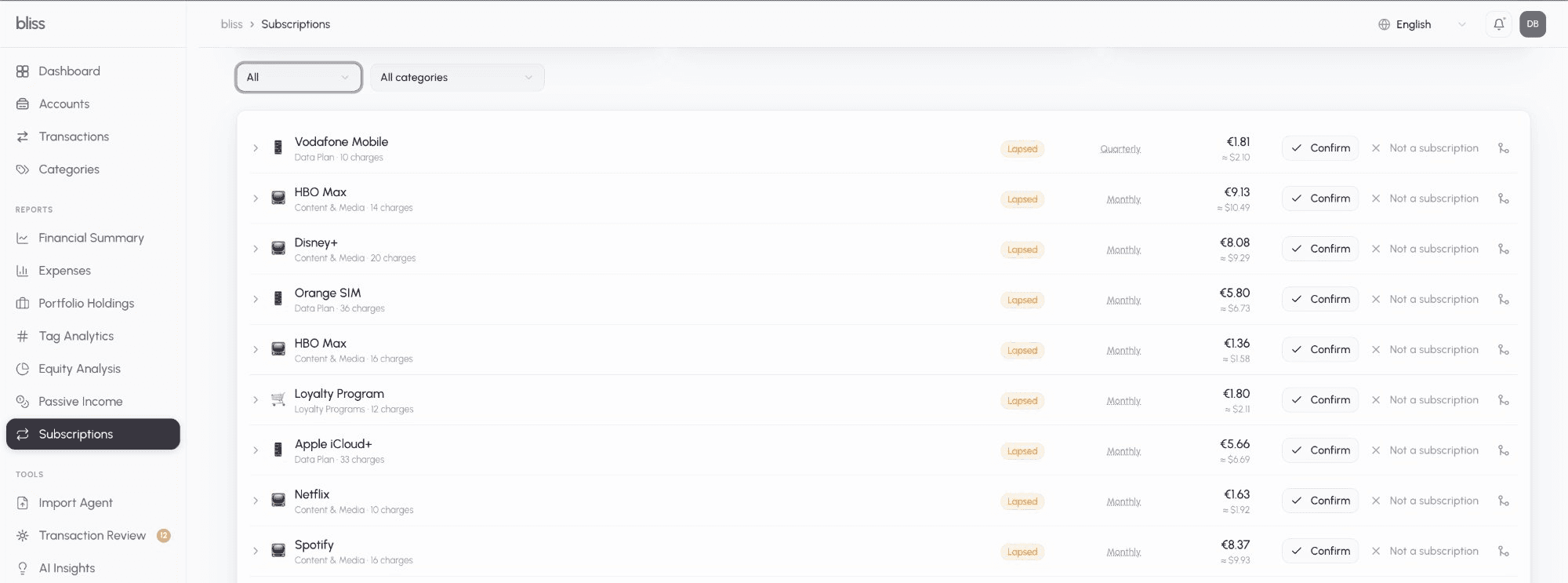
The Subscriptions page (/subscriptions) surfaces every recurring charge Bliss can find across your accounts — one row per merchant, with cadence, amount, next-expected-charge date, and a monthly + annualized recurring-spend total. Detection is deterministic (no LLM) and runs over your committed transactions, so CSV imports are covered exactly like Plaid-synced ones.
How detection works
A merchant appears on the Subscriptions page through one of two paths:
Tier A — category signal
Any transaction in a category marked Recurring charge counts. A single occurrence is enough. Bliss ships this flag on the obvious ones — the Subscriptions group (Software, Content & Media, Loyalty Programs), the insurance categories, Internet, and Data Plan — and you can toggle it on any category from the Categories page (open a category → Recurring charge).
Tier B — interval heuristic
For spending categories that aren’t marked recurring, Bliss looks for a pattern: 3 or more charges from the same merchant, at a stable amount, on a regular weekly or monthly interval, within the last 6 months. This catches gym memberships, storage lockers, and — because business expense categories (Cloud & Hosting, SaaS & Tools, Data & API Services, domains, ad spend) are also scanned — SaaS and infrastructure subscriptions, all without flagging the category. Quarterly and annual cadences are only detected via Tier A.
Merchant grouping
Charges are grouped by a normalized merchant key, so NETFLIX.COM, SQ *NETFLIX, PayPal Netflix, NETFLIX 08/15 POS DEBIT, and Netflix Inc all collapse into one subscription. Netflix and Netflix Games stay separate.
Aggregator merchants — the Apple App Store, Amazon, PayPal — bill many unrelated things under one name. When a merchant has a handful of charges that fall into clearly different price bands, Bliss splits it into one row per recurring price (e.g. Apple at €2.99, at €9.99, and at €22.00), so each real subscription shows a meaningful amount. A one-off large purchase mixed in doesn’t become a subscription.
Only debits (money out) are considered — a recurring credit is income, not a subscription.
When it runs
- Nightly, for every tenant, over a 6-month window.
- “Scan now” on the Subscriptions page re-runs it on demand (30-minute cooldown).
- “Full history scan” in Settings → Maintenance widens the category-signal lookback to 48 months, so annual subscriptions and long-dormant ones surface. Run this once after your first import.
Reviewing the list
Each row shows the merchant, its category, native amount (plus an approximate conversion to your display currency), cadence, last-charged date, next expected charge, and an Active / Lapsed status. A charge goes Lapsed when nothing new has landed within 1.5× its cadence; lapsed rows are hidden by default (use the Active / Lapsed / All filter) and don’t count toward the totals.
Expand a row to see the underlying transactions. Click the cadence label to correct it — your choice sticks and future scans won’t overwrite it. Correcting the cadence also re-checks the Active/Lapsed status right away, so an annual subscription that was mistakenly read as monthly (and parked in Lapsed) moves back to Active the moment you set it to Annual.
Rename a subscription
Hover a row’s name and click the pencil to give it a name of your choosing — handy when the bank descriptor is cryptic (SP * EIGHTEEN B) or you want a friendlier label. The custom name is kept on every future scan even as new bank descriptors arrive; a small custom name note appears under the row.
Merge two subscriptions
The merchant matcher is deliberately cautious and won’t join names that only share a first word, so the same service can occasionally show up twice — for example an active, confirmed Orange and a lapsed To Orange Espagne S.a. On the row you want to fold away, click the merge icon in its action buttons and pick the row to keep — the picker lists every subscription regardless of the current Active / Lapsed / category filter, so you can merge a lapsed row into an active one that isn’t currently on screen. From then on both merchants’ charges feed the one subscription — the kept row’s name, category, and totals win.
The folded-away row still exists, just hidden: switch the filter to All (or click the “N merged — manage” shortcut next to the filters) to see it, dimmed, with an Unmerge action that returns it to a standalone subscription. Merges survive re-imports and re-scans.
Split one row into two
Two subscriptions billed by the same company at almost the same price — say ChatGPT at €22.99 and Claude Pro at €22.00, both through Apple — are normally recognised as two subscriptions when both are charged in the same months. If they still show as one row, expand it and click Split by amount: from then on each recurring price gets its own row, and a confirmed row stays confirmed on both. The original row stays under All with an Undo split action. Splitting needs at least two different amounts that each repeat; a single price change on one subscription is not split on its own.
Confirm / dismiss
- Confirm pins a subscription: it stays on the list on every future scan even if it later stops matching the heuristic.
- Not a subscription removes it for good — that merchant is never re-surfaced. It moves to the All view with a Restore action if you change your mind.
These decisions are remembered per merchant, so re-imports and re-scans respect them.
Summary
The header shows your total monthly-normalized recurring spend and its annualized figure, in your tenant’s display currency. Weekly charges are scaled ×52/12, quarterly ÷3, annual ÷12. Rows with no available exchange rate are shown in their native currency and excluded from the totals (with a note).
Using Claude
If you’ve connected Claude to Bliss, it can list your subscriptions and, with a Read & write connection, confirm, dismiss, rename, merge, split or re-cadence them, or re-run detection, with the same 30-minute limit as Scan now.